Early access · built in Malaysia

Know where your business money is going.

Record what happens in your business each day: duit masuk, duit keluar, resit. NiagaKira turns it into a clearer picture of your money, your costs and how the business is doing.

No accounting knowledge neededBuilt for one person running the money
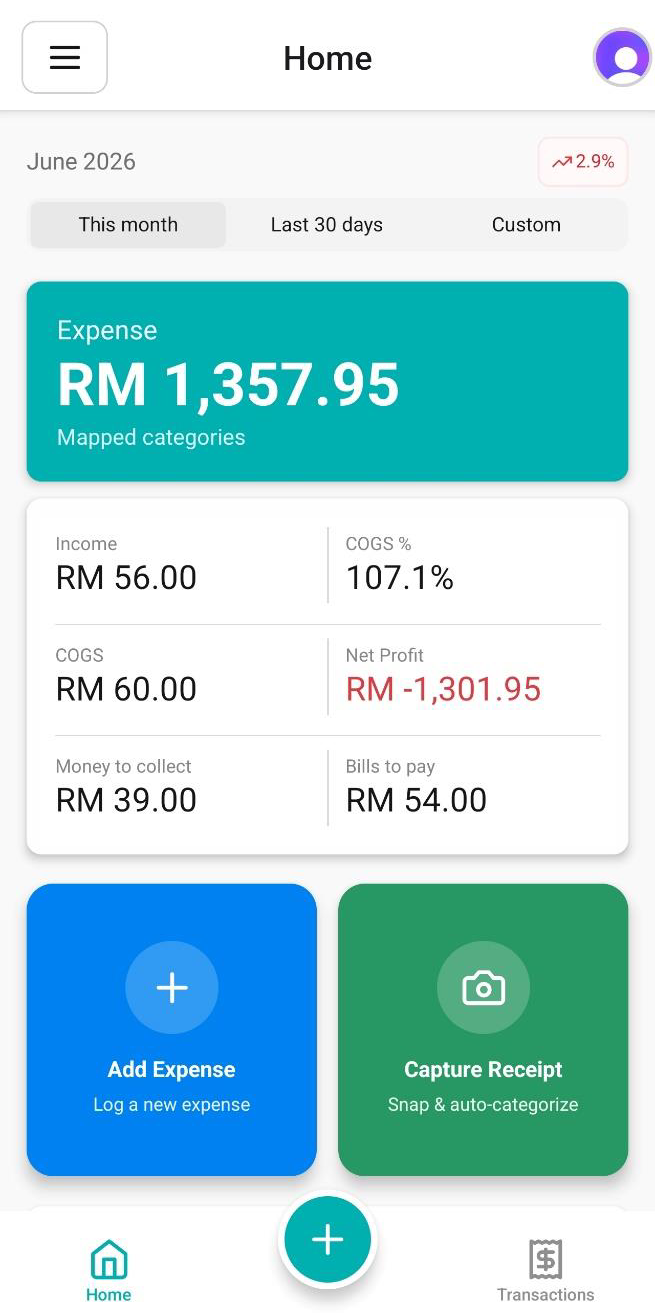
NiagaKira home screen showing the month's expense total, income, cost of goods and net profit, with shortcuts to add an expense or capture a receipt

Your business money is scattered. Your picture of it shouldn't be.

Sales come in, suppliers get paid, and the records end up spread across resit, WhatsApp, bank statements, POS reports, spreadsheets and memory. NiagaKira gives you one place to record what happened, and turns that into a clearer financial picture.

Resit
WhatsApp
Penyata bank
POS
Buku tulis
Spreadsheet
Ingatan
You enter it hereRecord in one place
NiagaKira home screen summarising the month
A clearer picture of your business money

Where the records are now

ResitWhatsAppPenyata bankPOSBuku tulisSpreadsheetIngatan
You enter it hereRecord in one place
NiagaKira home screen summarising the month
A clearer picture of your business money

These are examples of where your records may live today. Entries are recorded in NiagaKira rather than pulled in automatically.

You record what happened. NiagaKira handles the structure. You see the picture.

  1. 01You

    Record

    Record income and expenses as they happen. Snap a resit and let OCR suggest the details for review.

  2. 02NiagaKira

    Organises

    Every entry you confirm becomes a structured financial record, put together behind the scenes.

  3. 03You

    Understand

    See what came in, what went out, where the costs sit and what the month looks like.

The questions that actually matter when you're running the business.

These are the questions an owner already asks. The answers should be clear enough to understand at a glance.

Questions you can answer today

Duit masuk bulan ni?
RM 52,400
Duit keluar bulan ni?
RM 46,900
Kos paling besar?
Bahan mentah · 40%
Bulan ni untung atau rugi?
Untung RM 5,500

Where we're taking it

Being built
  • Kos mana yang sedang naik, dan berapa banyak?
  • Apa yang masih belum lengkap?
  • Apa yang patut saya tengok sebelum buat keputusan seterusnya?

These three are in design and validation. They are shown here as direction, not as features you can use yet.

What works today, and what we're still building.

Available now

Live in app
  • Record income and expenses. A few taps per entry, in the words you would use out loud.
  • OCR-assisted receipt capture. Snap a resit, OCR suggests the details, and you review and confirm before it saves.
  • Proper accounting underneath. Chart of accounts and double-entry records are created for you, out of sight.
  • Find any transaction. Full history with filters by date, type and category.
  • Read the month. Money in, money out, cost of goods, net position, top categories and merchants.

Being built and validated

Not yet available
  • Proactive clarity. Surfacing what changed and what may deserve a look.
  • Invoices and bills. Issuing them, and tracking what is owed and what is due.
  • Bank reconciliation. Matching your records against bank activity.
  • Deeper reporting. More ways to look at performance over time.

We will say so plainly when each of these lands. No dates until we are sure.

See NiagaKira in action.

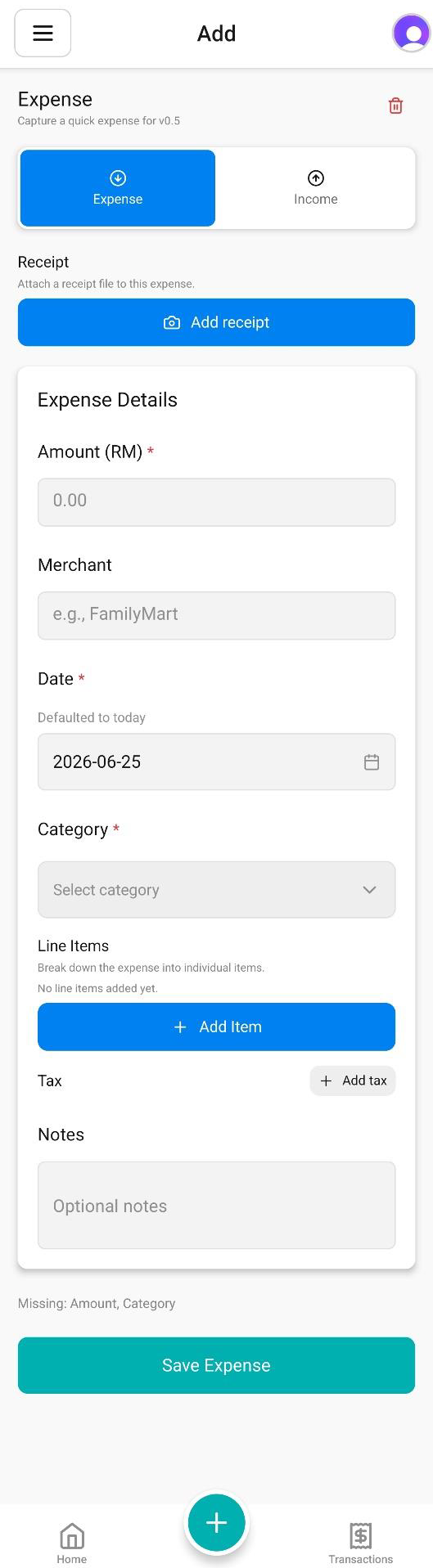
Four screens from the current build. The everyday loop is recording an expense, recording money in, and reading what it adds up to.

Other core views
NiagaKira home screen showing the month's expense, income, cost of goods and net profit, plus top spending categories and merchants
HomeYour business money at a glance.
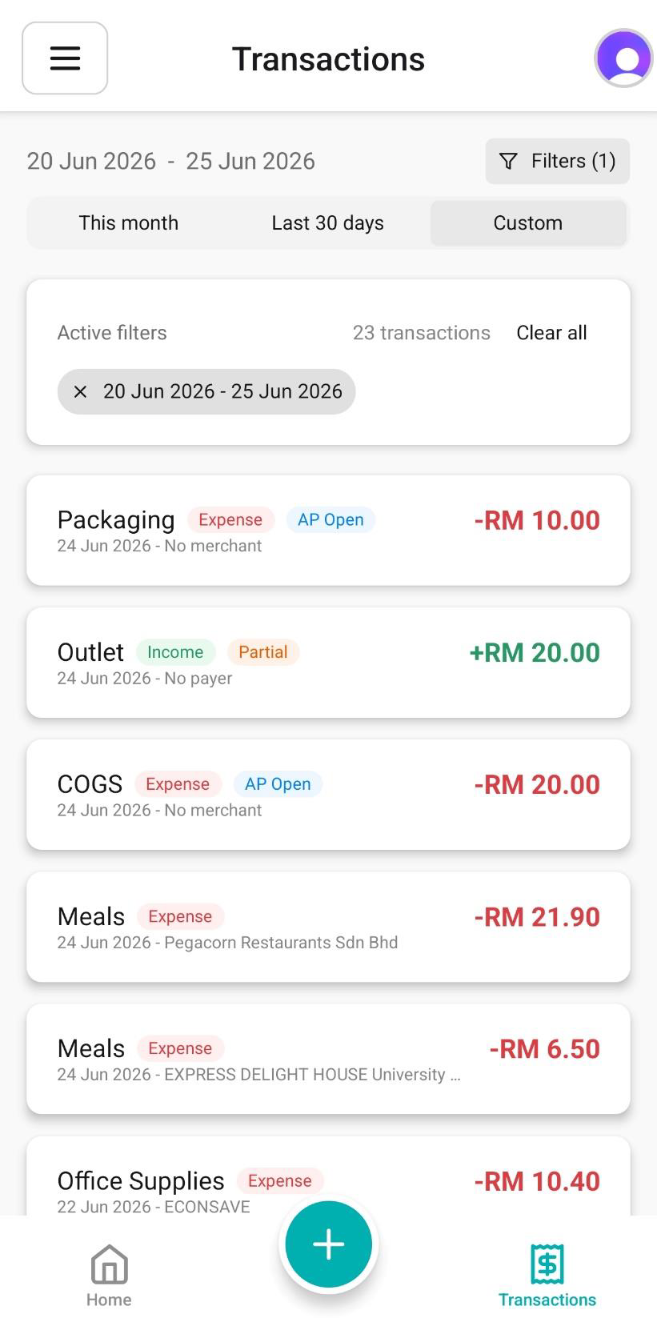
NiagaKira transactions screen listing recorded income and expense entries with dates, categories, merchants and amounts
TransactionsEverything you've recorded, in one place.
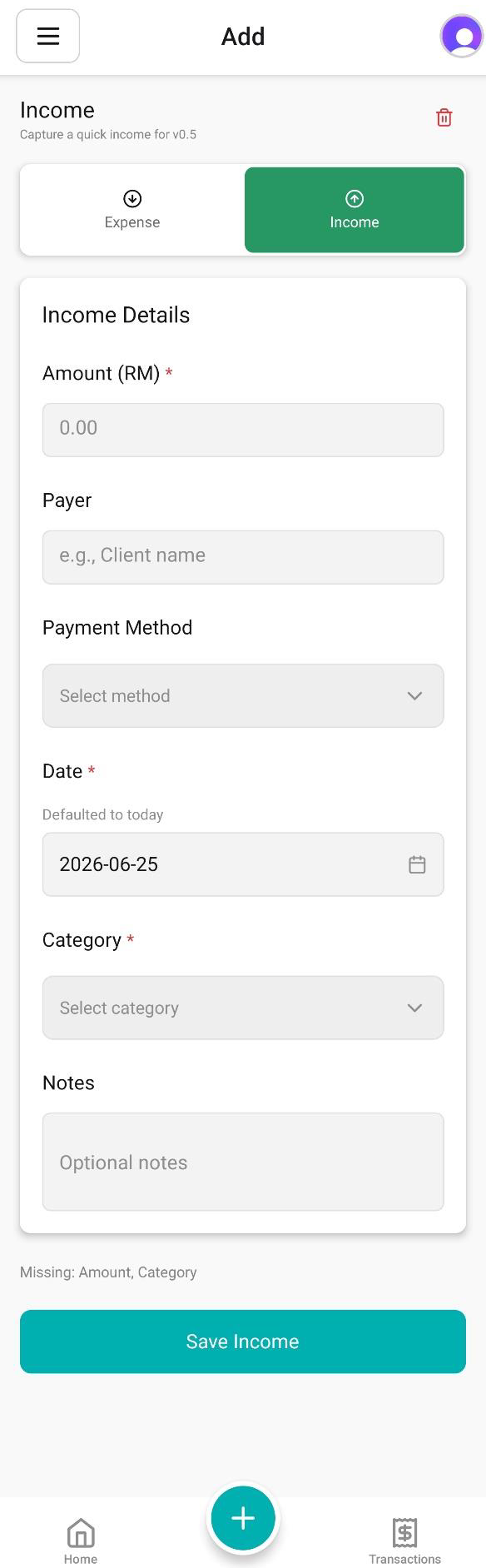
NiagaKira add income screen with amount, payer, payment method, date, category and notes fields and a Save Income button
Record incomeMoney coming in, without an accounting workflow.

Built for the person running the business.

NiagaKira is for Malaysian owner-run micro and small businesses, the ones where the owner personally handles the money, sales happen every day, and there is no finance team to hand it to.

If conventional accounting software has always felt like more system than you needed, that is the gap this is built for. Your accountant still gets clean records. That is what the structure underneath is for.

F&BRetailOnline businessesServicesHome-basedFreelance & self-employedTrades
Examples, not a list of supported industries.

Same accounting. Different starting point.

The usual route

Learn the accounting system first, then read your business through it.

Accounts, journals, postings, reports. It is all correct. It just asks you to become fluent in a system built for accountants before it will tell you how the month went.

NiagaKira's route

Record what happened in the business. The structure is handled behind it.

You describe the day in ordinary terms. NiagaKira keeps the accounting structure correct underneath and presents the picture back in language you can act on. The complexity stays; carrying it does not have to be your job.

It does not replace your accountant, and it does not make decisions for you.

See your business money more clearly.

NiagaKira is in early access while we validate it with real owner-run businesses. Join and we will be in touch when there is something for you to try.

  • ·Expect rough edges, and a direct line to us
  • ·What you tell us shapes what gets built next
  • ·Your email is only used for early access. Nothing else.

We will only email you about early access.

Straight answers, before you sign up.

Is NiagaKira accounting software?

There is proper accounting inside it, but that is not the part you use. What you see is built around recording everyday business money and understanding what it means. The accounting exists so your records are correct, not so you have to learn them.

Do I need accounting knowledge?

No. The everyday workflow is the amount, the category, and who it was with. If you have never used accounting software, you are the person this is designed for.

What kind of business is it for?

Malaysian owner-run micro and small businesses where you personally handle the money. F&B, retail, online, services, home-based, freelance and trades are all examples rather than a fixed list. It suits you less well if you already run a finance team.

Can I use it alongside my POS or bank account?

Yes. Nothing needs to change about how you take payments, and NiagaKira sits alongside whatever you already use. To be clear about what it does not do yet: there is no automatic connection to your POS or bank today, so entries are recorded in the app. Bank reconciliation is one of the things being built.

Is NiagaKira available now?

It is in early access and under active validation with real businesses. Recording, receipt capture, transaction history and the monthly picture work today. The insight, invoicing, reconciliation and reporting layers are still being built, and we would rather say that plainly than promise a date.